

MCC Guarantee Fund Rating Calculation
What is the Leanus MCC Fascia Module?
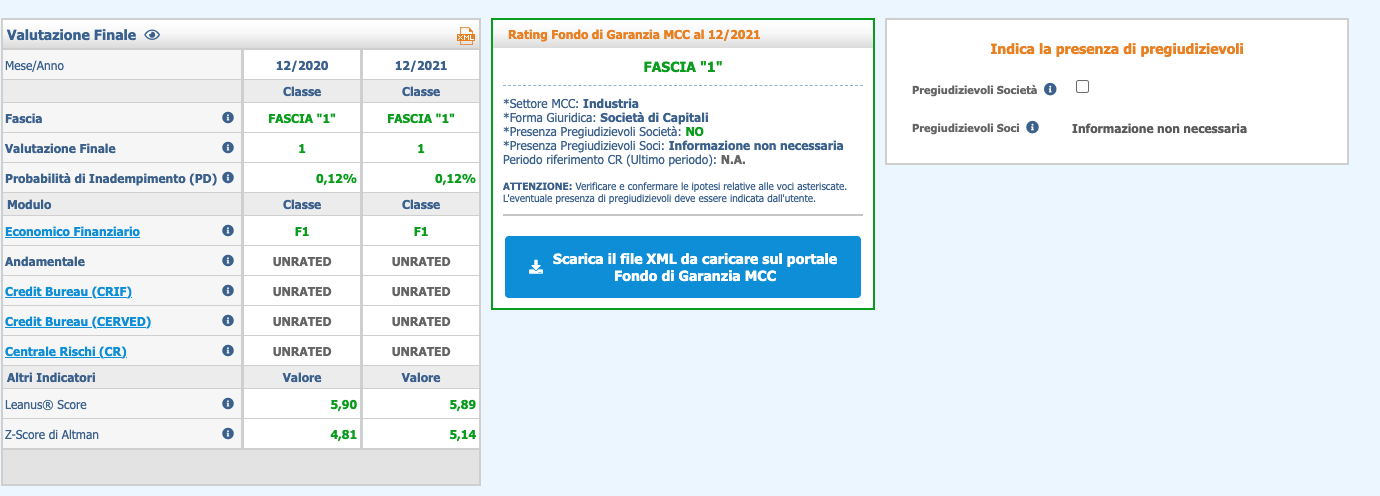
The MCC Band module allows you to determine in real time the Probability of Default (PD), the Rating and the related Band of the MedioCredito Centrale
This assessment is an essential step in determining a company's eligibility for the Guarantee Fund for SMEs.
How is the evaluation structured?
The analysis is based on three fundamental pillars:
Economic-Financial Module: Automatically processed by Leanus based on the Civil Law Scheme
Performance Module (Credit Bureau): Integrates information from external credit information systems
Performance Module (Central Risk Office): Allows you to import and analyze PDFs from the Central Risk Office
La Final evaluation allows you to obtain the value of the Band from which to derive the degree of coverage
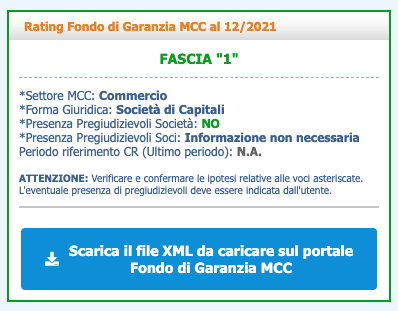
Important: It is possible to download XML to be uploaded to the MCC portal
Operational advantages of the platform module
 Zeroing calculation timesCompared to traditional Excel spreadsheets, Leanus calculates the MCC band instantly and without the risk of formula errors for each budget year.
Predictive analytics and simulationsIt is possible to calculate the MCC range not only on historical data, but also by simulating future scenarios within the Business Plan module or by applying adjustments to the source data.
Integration into credit processesThe calculation is natively connected to the credit pre-investigation procedures and to the evaluation of the residual debt capacity, making it a key tool both for bank Risk Managers and for consultants and CFOs who have to prepare the documentation for the request for State-guaranteed financing.
Procedure
 Log in to Leanus and search for the company you wish to evaluate.
 Go to Menu Last Period Evaluation/MCC Guarantee Fund Rating (visible in the Reserved Area)
 View the Evaluation class via the Menu Economic and Financial ModuleVerify that the MCC Sector and legal nature match the actual characteristics of the company being analyzed. If necessary, select the correct data using the appropriate drop-down menus.
 Enter the information relating to the Central Risk Office or Credit Bureau via the Menus Behavioral module
 View the Final evaluationCheck the appropriate boxes if there are any Prejudicial Factors (the final evaluation processed by the system takes this into account).
 Download the XML to upload to the MCC portal
ImportantIf the rating is "Unrated," check the reasons in the tables below. The bracket is calculated by taking the data from the official source if it is in statutory format. If the source you are using is not (e.g., a provisional financial statement not reclassified in statutory format), you must first complete the Statutory Form (under Source and Reclassification).



Post your feedback on this topic.